


I suddenly found myself in possession of a small toy RC Helicopter in relatively good shape, but with one missing piece – the radio transmitter! If you’ve ever researched the possibility of finding a drop-in replacement for these things, you’ll know how difficult it is. It’s almost impossible to buy a replacement, and aftermarket/well known brands with known protocols will undoubtedly never work. It’s usually cheaper to just buy a whole new RC Helicopter package. But what’s the fun in that?
The RC Helicopter
To be clear what we’re working with, it’s this bad boy (sans the remote):

It’s a Revell Argus. No longer available, but here’s a similar model. It’s not great. It has a camera with an SD card slot, but the video quality is more like early 2000’s flip phone era. Brushed motors, a short flight time, and takes forever to charge. Perfect for this project!
The Goal
My goal wasn’t to improve the flight characteristics or anything like that. The only thing I wanted to achieve was to fly it using an XBOX controller 😄

I know, the range would be pretty limited, but it would still be more than enough for my backyard!
The How
Flight controls are pretty basic since it’s only a three channel. Yaw is controlled by main rotor differential speed. Forward/aft by alternating rotation of the horizontal tail rotor, and a main throttle to control the main rotors primary speed. I originally intended to use an Arduino Nano I had laying around since it has more than enough power to handle this application. I’d pair it with an HC-05 Bluetooth module to handle comms with the XBOX controller.
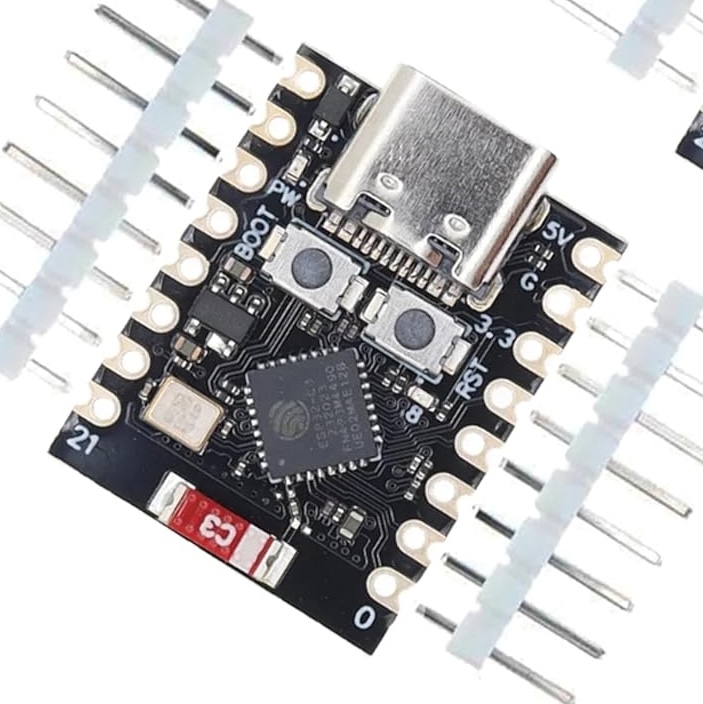
However, I stumbled across the ESP32-C3 Super Mini while researching for another project I had in mind, and realized it would be perfect for this one. It’s smaller, lighter, faster, uses less power, and has built-in Bluetooth and Wifi! Except for some doubts I had with respect to the range, it seemed like the perfect fit.
Stripping the existing controller
The next step was to power up the existing controller board and start probing and scoping out my connection points. The main rotor drivers seemed to be standard MOSFETS. The tail rotor was driven by an MX612 driver chip (the only datasheet I found was mostly all in Chinese). The power for the camera module (which I didn’t plan on using anyways) was stepped up from the 1S 3.7 volt LiPo to a decent 4.5 volts, plenty enough for the ESP32.
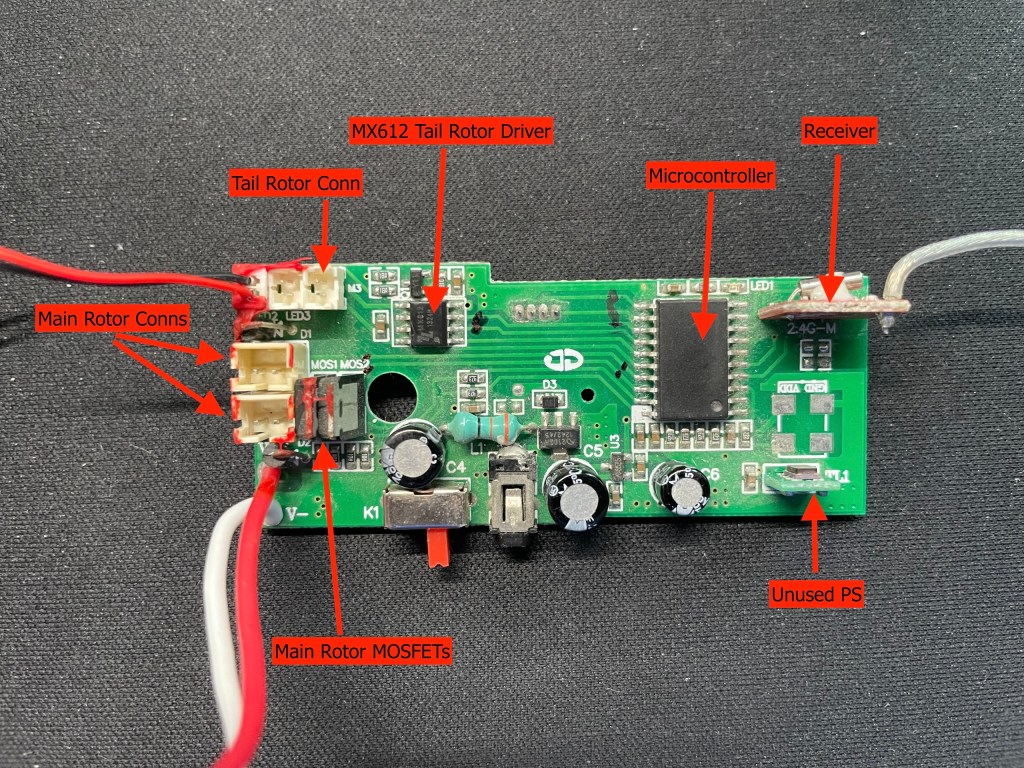
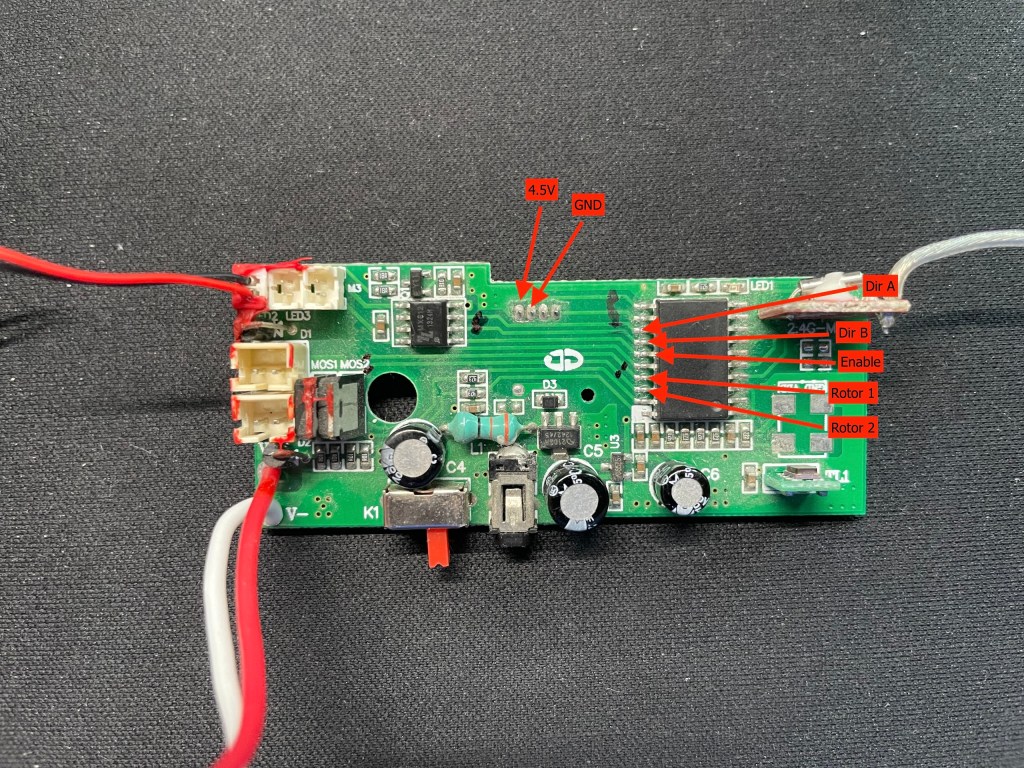
I then ripped out the original receiver daughter board and the original controller/micro IC. I scraped off the board’s protective coating from the traces I needed to use and soldered some wires to them for eventually connection to the ESP32. Here’s a photo of the soldered on wires and removed components:
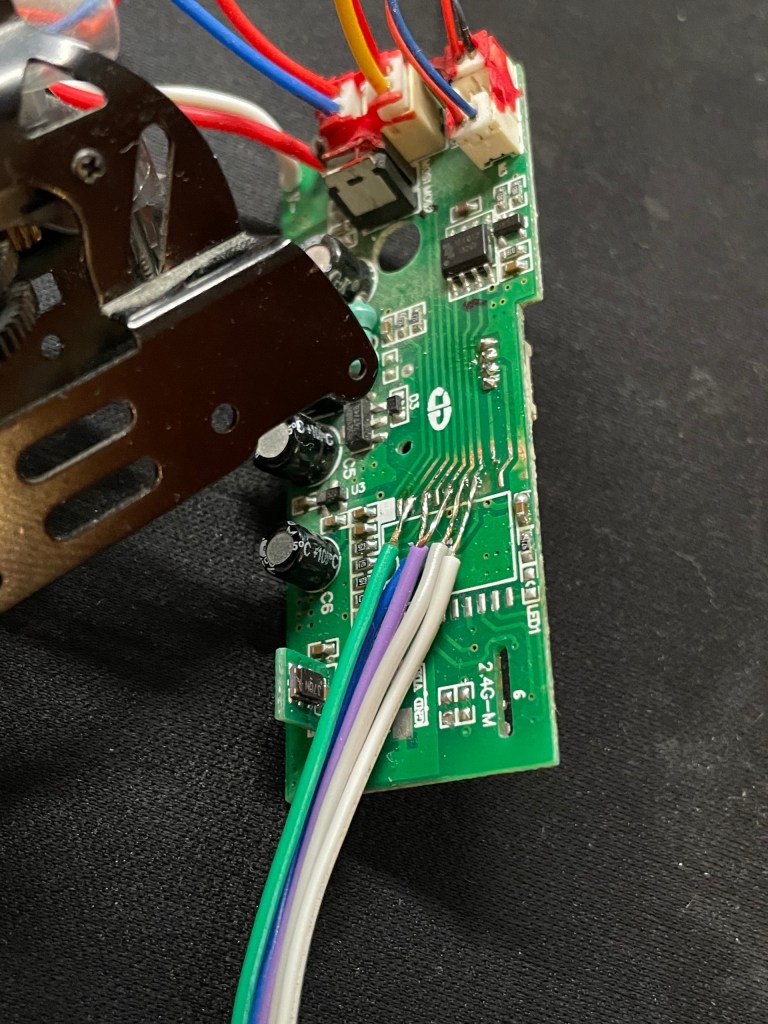
I keen eye would notice the lack of soldered wire connections for the ESP32 power. Since I wasn’t planning on using the camera, I hijacked its connector which is on the underside of the board. So no need for tapping into the board.
Connecting the ESP32 to the XBOX controller
The next phase was to try and actually get the XBOX controller to connect and talk to the ESP32. After some searching and a few failed attempts, I stumbled upon the Bluepad32 library.
I followed the Arduino IDE installation instructions as layed out in the installation docs, using Option A. I then loaded up the example sketch per the instructions and attempted to compile and upload it to the ESP32.
This is where it got a little tricky. My ESP32 is a no-name clone, so it’s not included in the list of boards with the library. After some trial and error, I found the Adafruit QT Py ESP32-C3 worked. (Iirc, I think the LED was on a different pin, but otherwise it worked perfectly).
After it uploaded, I opened up the serial monitor and turned on the XBOX controller. And just like that, it connected and started spewing values for all the buttons on the controller – pure magic!
Here’s a short video (no sound) of the sketch upload, the controller connecting, and the values in the serial monitor updating as I activate the different buttons and sticks on the controller:
The Buttons
Based on the output from the serial monitor and the way the library was configured, I decided to use the R2 button as my throttle, and the left stick for yaw and forward/aft control. This turned out to not be the most ideal, at least not compared to other RC Helicopter controls. In a future iteration I will probably change things up for a better flying experience. I also made the “A” button an “enable/disable” switch for safety. I added logic to prevent the “disable” button from working in mid flight. Lastly, I used the R1/L1 buttons for minor yaw adjustments during flight.
The Code
The sketch can be downloaded on my Github page from this repository. Or, use this link to download it directly as a zip file.
It’s decently commented, so I won’t go into detail here. Feel free to ask for details in the comments if something isn’t clear.

Did it fly?
Yep, it flew! It flew exceptionally well, to be honest. Unfortunately I didn’t take any video, but I’ll try to get some the next time I do fly it.
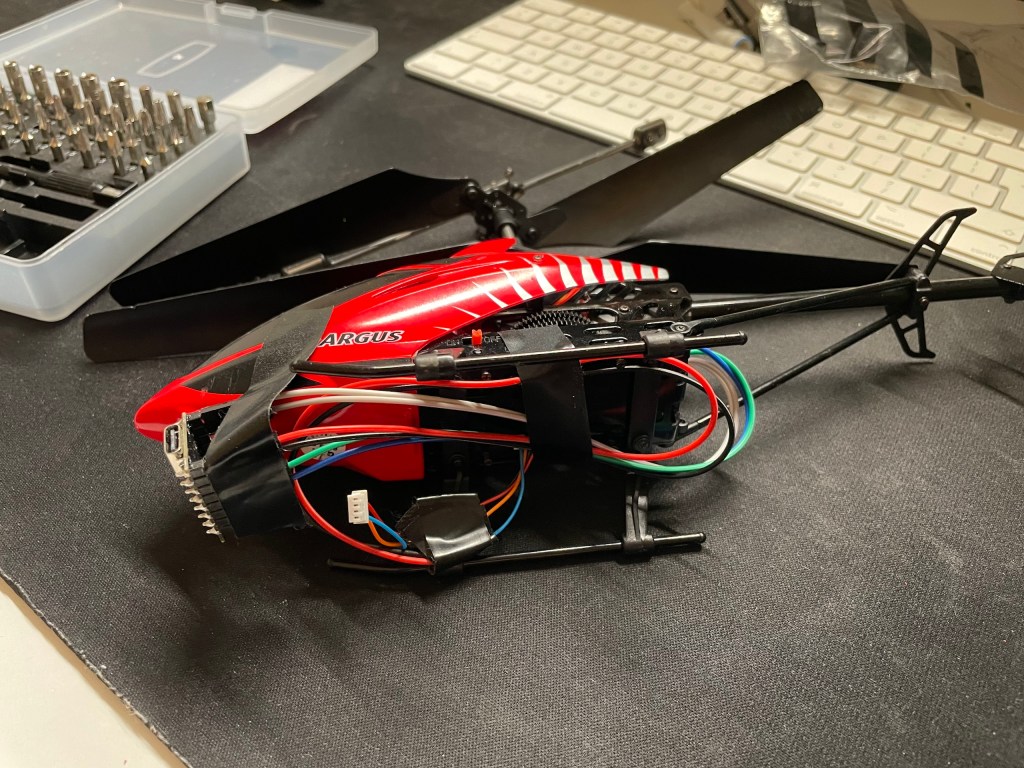
Here are a couple of pictures showing the make-shift setup for the test flight:

However…
While it did fly, there were a few less than ideal things.
Now, I didn’t do too much tuning – for example yaw control was overly sensitive, though it worked better than expected. Probably the trickiest part was getting the yaw adjusted and stable. Maybe with some better tuning it may have worked, but it varied a fair bit with throttle changes. I found myself actively controlling yaw throughout the flight with some pretty heavy stick movements. I suspect there’s probably a gyro chip on the board somewhere I might have missed.
The other issue was poor forward/aft control. Again, it could do with some tuning here. Forward direction was ok, while aft was almost non-existent. There’s probably some flight physics owing to this around the horizontal tail rotor setup since the aft direction induces a force opposite to the main rotors. It may also be a balance issue considering where I had the ESP32 taped to the fuselage.
Overall though, I was pretty happy with the inaugural flight!
What’s Next?
Stay tuned! I’m looking into adding some gyro (for automatic yaw control) and altitude hold controls via an MPU-6050 and HC-SRO4. I’m not sure if it will still fly with the extra weight though. Let’s see! 🤞

 Nick P
Leave a comment